How to Redeem Blue Lock Farm Codes
Shop button, scroll to the code box, paste carefully, and claim rewards without joining a group.
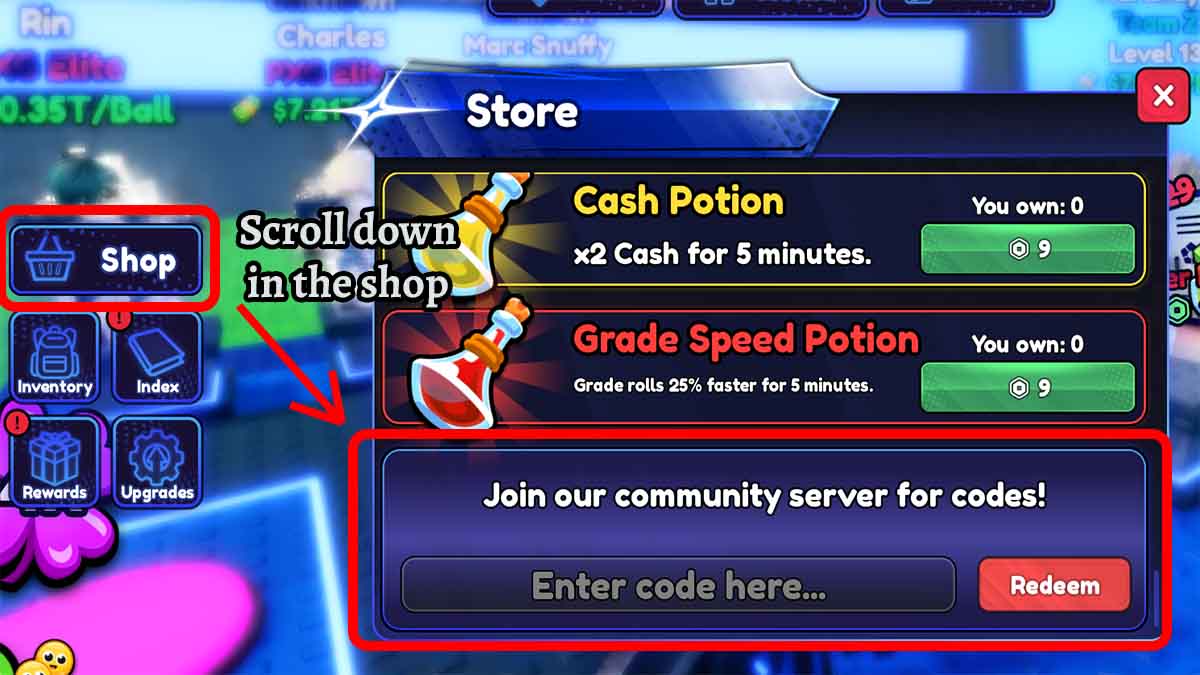
Redeeming codes in Blue Lock Farm takes less than a minute once you know where the Shop hides the text box. Many new players tap every other menu first, mistype case-sensitive strings, or assume they must join a Roblox group. None of that is required. This walkthrough covers the exact HUD path, what each common reward does after it lands in your inventory, and how to fix the errors that appear when a code is expired, already used, or typed wrong.
Before you start, open the live list on the Codes Hub so you paste current strings (ADMINABUSE2, BALLS, WEATHER, COMMUNITY as of early October 2026). After you claim freebies, return to Getting Started to spend them on the early farm loop, and skim Updates whenever a patch might move the Shop UI.
Requirements checklist
- A Roblox account that can join Blue Lock Farm (place 132767904294856 by Finding Illusions).
- The experience fully loaded past the tutorial or join screen so the left HUD is visible.
- Working codes copied from a trusted list—never from a site that asks for your password.
- No group join, no Discord login inside Roblox, and no third-party “code unlocker” app.
If the left Shop button is missing, finish any forced tutorial prompts first, or rejoin the server. Soft UI failures after a big update are also called out on Updates.
Step-by-step redeem path
- Launch Blue Lock Farm from Roblox on PC, mobile, or console. Wait until your farm plot and left-side buttons appear.
- Press the Shop button on the left side of the screen. Shop is the same panel used for purchases; codes live at the bottom of that panel, not in a separate Codes tab.
- Scroll all the way down inside Shop. Keep scrolling past gamepasses and cash offers until you see a text field labeled along the lines of Enter code here.
- Paste one code into the field. Prefer paste over typing because codes are case-sensitive (ADMINABUSE2 is not the same as adminabuse2).
- Press Redeem (or Claim, depending on the current label). Watch for a success toast and check your inventory, balls, potions, or token counters.
- Clear the field and redeem the next code. Each code works once per account.
You do not need to join the developer group to redeem. Group rewards, if any exist later, are separate from Shop codes.
Mobile vs desktop tips
On phones and tablets, the Shop panel can feel short. Drag the scroll area firmly to the bottom; the code box often sits under long product lists. Rotate to landscape if the keyboard covers the Redeem button—paste the code first, dismiss the keyboard, then tap Redeem.
On desktop, click once inside the text box before pasting so the field is focused. If nothing happens after Redeem, wait a second for server confirmation before spamming the button; double-submit rarely helps and can make the UI feel stuck.
What success looks like
A good redeem usually shows a short confirmation and adds items immediately:
- ADMINABUSE2 → a Monster Ball inventory toast (or Monster Ball count +1).
- BALLS → inventory toasts (or counters) for Monster, Beach, and Supercharged Balls, one each.
- WEATHER → Grade Tokens and a Luck Potion appear (commonly five Grade Tokens plus one Luck Potion).
- COMMUNITY → Three Cash Potions, three Luck Potions, and three Grade Speed Potions land together.
After ADMINABUSE2 or BALLS, watch specifically for the special-ball toast before you close Shop—those balls are easy to miss if you only glance at potion stacks. If the toast is easy to miss, open inventory or the currency/token displays and compare before-and-after numbers. Balls and potions are the easiest to spot; Grade Tokens and Trait Tokens show on their respective counters. Full usage tips for every special ball type live on Special Balls.
What each reward is for
Use free rewards with intent instead of dumping them on day-one units you will replace:
- Monster / Beach / Supercharged Balls — Specialty pull items. Open them when you have cash to buy rolled lockers and empty placement slots on the farm. Read Special Balls before you burn a Monster Ball from ADMINABUSE2 or the three-ball BALLS package on a weak early board.
- Grade Tokens — Push grades on keepers that already earn well. Grading weak temporary units wastes the same tokens you just redeemed.
- Trait Tokens — Fuel trait rerolls. Read the traits tier list before spending a large stack.
- Variant Token — Hold for a variant you actually want if an older code still grants one on your account.
- Cash Potion — Pop during an active earning window with strong units placed.
- Luck Potion — Activate immediately before a focused roll session.
- Grade Speed Potion — Use when you are actively converting Grade Tokens into upgrades, not while AFK with no tokens left.
Pair this guide with the Codes Hub reward table whenever a new code drops with unfamiliar loot.
Troubleshooting failed redeems
Invalid code / does not exist
Check spelling and capitalization. Remove leading or trailing spaces. Confirm the string is still listed as active on the Codes Hub. Expired codes such as POLISHER, TRAITS, and ADMINABUSE often return this message—even if another website still lists them.
Already redeemed
Codes are one-time per account. Alt accounts need their own redeem. If you share a household PC, make sure you are on the correct Roblox user.
Nothing happens when I press Redeem
Refocus the text box, ensure the Shop panel finished loading, and try again after a short wait. Rejoin the experience if the UI froze after an update. Check Updates for known client issues.
I cannot find the code box
You are probably not scrolled to the bottom of Shop, or you opened a different left-side menu. Close other panels, reopen Shop from the left, and scroll until the enter-code field appears.
Rewards missing after a success message
Refresh inventory views, check potion and ball stacks specifically, then rejoin once. Server lag can delay counter updates. If the toast never appeared, the redeem likely failed—paste again carefully.
Someone asks me to redeem on a website
Stop. Official redemption happens only inside Blue Lock Farm’s Shop. External forms that request your Roblox password are phishing.
Trying “expired” codes safely
As of the October 5, 2026 Destructoid pass, POLISHER, TRAITS, and ADMINABUSE are expired. Other sites sometimes still mark TRAITS or ADMINABUSE as live. It is safe to paste them once in the Shop: either you receive the old Trait Token / Grade Token / Variant Token package, or the game rejects the string. Never pay for a “private working list” that recycles those same three words.
After you redeem: first 10 minutes
- Confirm balls, potions, and tokens in your HUD.
- Place or upgrade units using guidance from Getting Started.
- Save Luck Potions for your next intentional roll block.
- Spend Grade Tokens on keepers, not on units you plan to sell.
- Bookmark the Codes Hub and re-check after community or weather events.
- If you use automation later, read the Scripts Hub risk notes—codes are the risk-free boost; scripts are not.
Finding new codes early
Blue Lock Farm posts codes around admin abuse moments, community thank-you drops, and weather-themed updates. The Roblox experience page links social channels, and the official Discord includes a codes-oriented channel when developers announce strings. This wiki does not replace those announcements; it summarizes working codes after reliable public lists update. When a patch rearranges menus, this redeem guide is updated alongside Updates.
Redeem discipline that saves progress
Redeem every active code the same session you discover it. Do not screenshot a code and wait a week—expiry is silent. Keep a simple habit: log in, open Shop, paste the whole active table from the Codes Hub, then play. That single routine captures Monster Balls, potion stacks, and Grade Tokens without relying on rumor screenshots in random chats.
Codes are the supported progression shortcut in Blue Lock Farm. Master the Shop path once, and every future drop takes seconds to claim.
Frequently Asked Questions
Quick answers to the most common Blue Lock Farm questions.
Where is the code box in Blue Lock Farm?
Open the Shop button on the left side of the HUD, then scroll to the very bottom of the Shop panel until you see the Enter code here field.
Do I need to join a group before redeeming?
No. Blue Lock Farm codes redeem directly in the Shop with no group requirement.
Why does my code say invalid?
Usually a typo, wrong capitalization, extra space, true expiry, or a code you already redeemed on that account. Copy-paste from the Codes Hub and try once more.
Can I redeem the same code on multiple accounts?
Each Roblox account can redeem a given code once. Alt accounts must redeem separately while logged into that account.
What should I do after redeeming COMMUNITY or WEATHER?
Confirm potions and Grade Tokens arrived, then use Luck Potions right before rolling and spend Grade Tokens on units you plan to keep. See Getting Started for the early loop.